Morpheus Uplink: Your Own OpenAI-Compatible Gateway to Decentralised Inference
Uplink puts API keys, automatic sessions and a stake dashboard in front of a Morpheus consumer node. Tested on our own VPS, with the three traps we hit.
What Uplink Fixes
A raw Morpheus consumer node is hard work to use from software. The proxy-router authenticates with a username and password rather than an API key, and it won’t answer a chat request until you’ve opened a session for that model yourself: approve MOR, look up the model’s on-chain ID, stake, pass the session ID in a header, then remember to close it. None of that looks like the OpenAI API that most agent frameworks, IDEs and SDKs already speak.
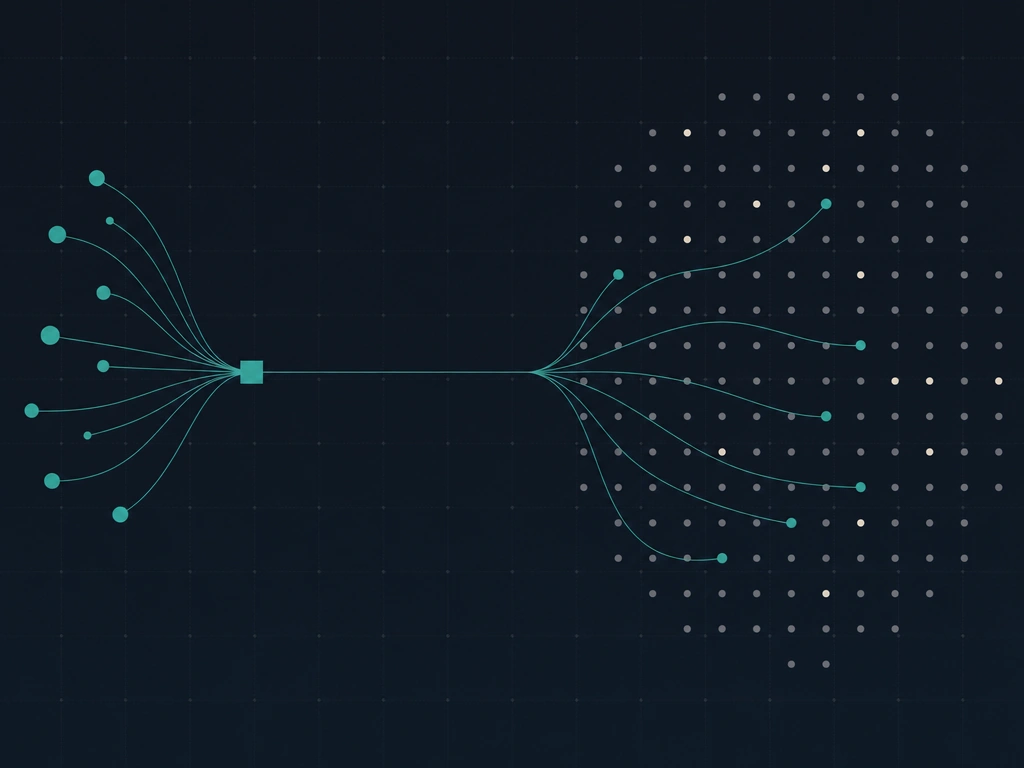
Uplink wraps those steps. A request arrives with a model name and a Bearer key, Uplink finds an open session for that model or opens one, forwards the prompt and streams the answer back. It also counts tokens per key and per model, and pulls your locked MOR back once the day’s lock expires.
The Uplink stack
There are now three ways to call Morpheus models from code, and they suit different people.
Three ways to reach Morpheus from code
| api.mor.org gateway | Raw consumer node | Uplink | |
|---|---|---|---|
| Who holds the wallet | Morpheus runs it | You | You |
| Auth | API key | Username and password | API keys you issue |
| Sessions | Pooled across users | You open and close them | Opened and reused for you |
| Usage records | Credits account | None | Per key, per model, per day |
| Setup | Sign up | Binary plus config | One compose file plus six secrets |
What You Need
The Uplink repo lists a short set of prerequisites, and we’d add one opinion to it: pay for the RPC.
- A host that runs Docker Compose and serves HTTPS. The Uplink README recommends SecretVM from Secret Labs, which keeps the wallet key inside an encrypted enclave. We haven’t tested that path. Any VPS works too, and that’s what this guide covers.
- A dedicated consumer wallet on Base with a little ETH for gasGasThe fee paid to a blockchain to process a transaction. Gas is denominated in the chain's native token and varies with network demand. Sending a transaction without enough gas means the transaction fails and the gas is still consumed.Like the petrol that powers a car. You need to put petrol in to make the engine run. The amount of petrol you need depends on how far you're driving and how much you're carrying. If you run out, the car stops.Gas in the glossary → and some MOR for session stake. Use a fresh wallet rather than one that holds anything else.
- A Base RPC endpoint from Alchemy or Infura. The free public endpoints caused us real trouble, covered under the traps below.
- A domain name you can point at the server.
How much MOR? Each session locks stake for its duration, and the amount depends on the provider’s price and the day’s emission budget. Uplink’s Probe tab shows the lock for every model before you commit. On 27 September 2026 the cheapest chat models locked between about 0.5 and 1.2 MOR for a 10-minute session.
Deploying on a Fresh VPS
The documented generic-VPS path pulls three containers: Caddy for HTTPS, Uplink itself, and the Lumerin proxy-router. Download the release compose rather than cloning the repo, because the release pins each image to an exact digest.
mkdir -p uplink && cd uplink
curl -fsSL -O https://github.com/MorpheusAIs/Morpheus-Uplink/releases/latest/download/docker-compose.generic.deployed.yml
curl -fsSL -o .env https://github.com/MorpheusAIs/Morpheus-Uplink/releases/latest/download/env.generic.example
Point a DNS A record at the server and open ports 80 and 443. Then fill in .env with your hostname plus six secrets:
PUBLIC_HOSTandWEB_PUBLIC_URL: your hostname, the second withhttps://in front.WALLET_PRIVATE_KEY: the consumer wallet’s key.ETH_NODE_ADDRESS: your Base RPC URL.COOKIE_CONTENT: auser:passwordpair the router and Uplink share.ADMIN_PASSWORD: your login for the web console.API_KEY_SEED: the output ofopenssl rand -hex 32. Your two built-in API keys are derived from it.
docker compose -f docker-compose.generic.deployed.yml --env-file .env up -dCreate the DNS record before anything looks the name up. We added ours afterwards, and both Caddy and my Mac’s VPN resolver cached the “no such domain” answer for half an hour. Caddy then backed off its certificate retries until we reloaded it.
Already Running a Consumer Node?
We already had a proxy-router running as a service on our server, so we ran Uplink on its own and pointed it at the existing router. Uplink reads the router’s address from ROUTER_URL, so the change is one line, and the router carries on with the wallet it already had.
Two rules apply if you do this:
- Never run a second router against the same wallet. Two processes signing for one address will collide on transaction nonces and close each other’s sessions.
- Upgrade the router first. Uplink’s release compose pins a pre-release build,
v7.11.6-test, and the stable v7.12.0 released on 25 September 2026 contains every commit in that build and 15 more. We upgraded from v7.11.0 in place, with no sessions open at the time.
Run Uplink with host networking so it can reach a router listening on 127.0.0.1, bind it to 127.0.0.1:8080, and let your existing reverse proxy publish it. The router’s own port stays private either way.
First Login and Funding
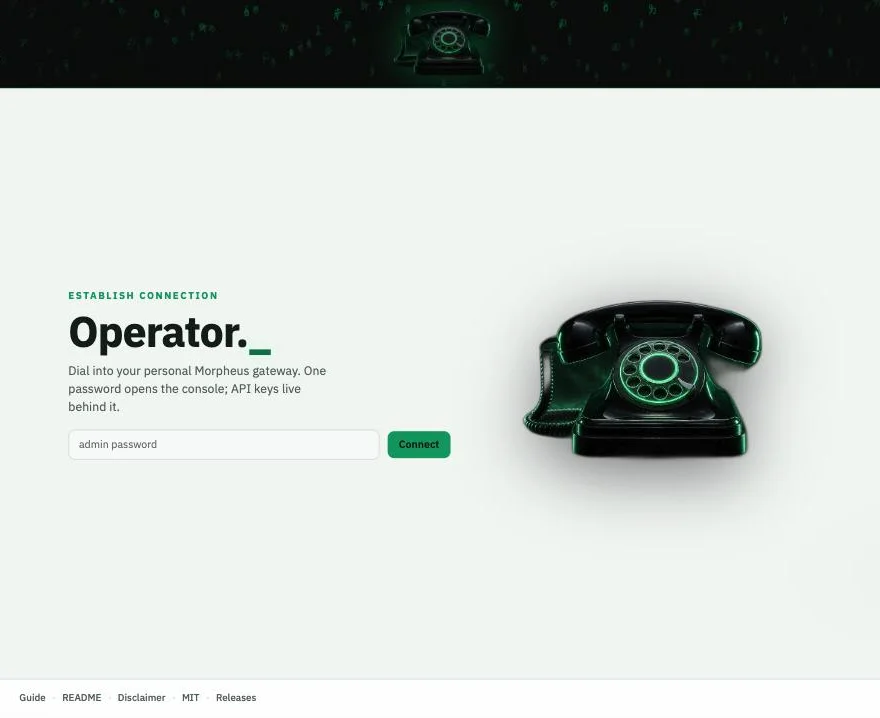
The console lives at /gui/ on your hostname and asks for one password.
The Status tab is the one you’ll use most. The top panel gives you the three things any client needs: base URL, API key and model name. Below it, your MOR is split across four buckets.
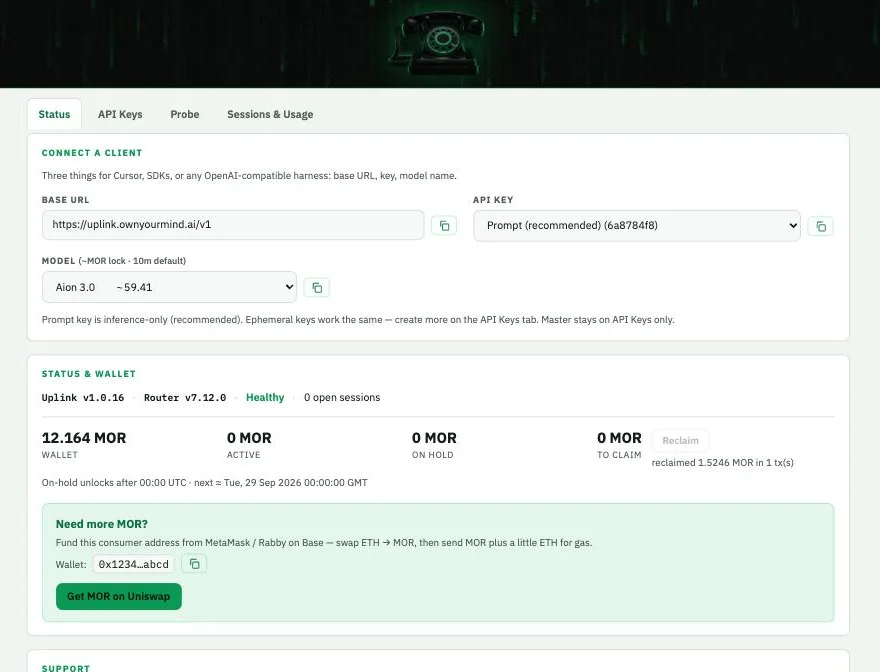
Fund the wallet shown in the green panel with a little ETH and some MOR on Base. The MOR token address on Base is 0x7431aDa8a591C955a994a21710752EF9b882b8e3; copy it from mor.org rather than trusting a search result.
Keys Are Spend Authority
Uplink starts you with two keys derived from your seed: a Master key with admin rights, and a Prompt key that can only run inference. You can create more named keys, one per app or agent, which makes the usage table far easier to read.
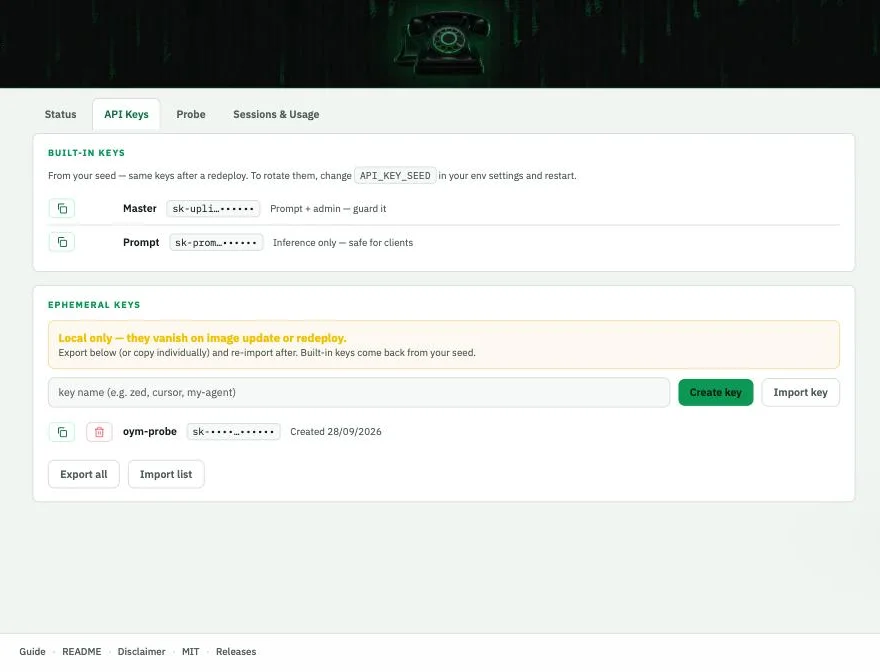
Any key that can prompt can also open sessions, and every session locks MOR from your wallet. Hand a key only to software you’d trust with that wallet. The named keys also live only on the box: they vanish when the container is recreated unless you export them first, while the Master and Prompt keys come back from the seed.
Your First Prompt
The Probe tab sends a test prompt with any key and model, and shows the MOR the session will lock before you commit. It also writes a ready-made curl command for the same request.
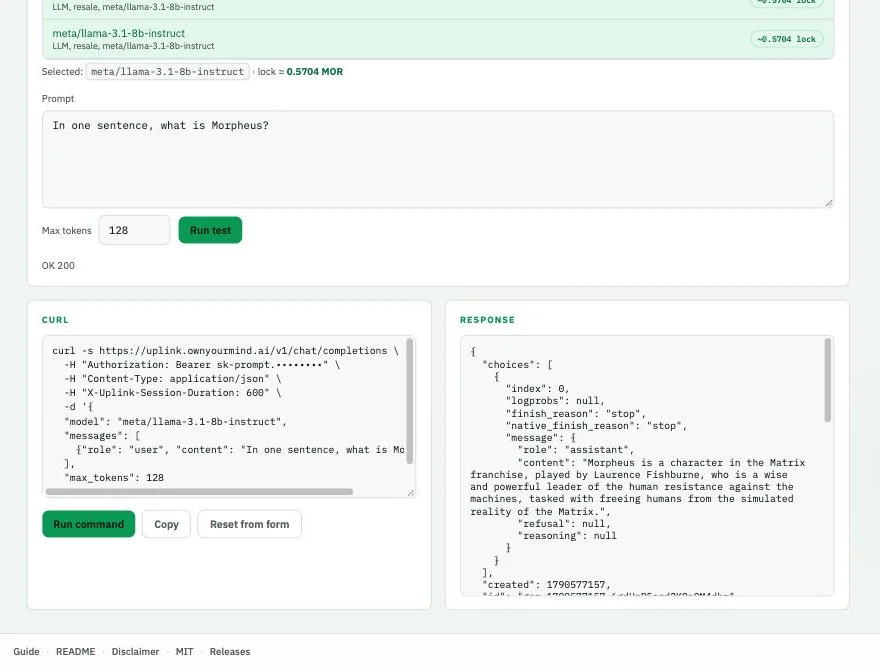
The answer in that screenshot is wrong, and usefully so. Asked what Morpheus is, Llama 3.1 8B described the character from The Matrix. Cheap models are fine for plumbing tests; pick something stronger before you judge the network on its answers. DeepSeek V4 Flash returned a correct one-sentence answer through the same setup in two to three seconds.
From code, Uplink looks like any OpenAI-compatible provider:
from openai import OpenAI

client = OpenAI(base_url="https://YOUR_HOST/v1", api_key="sk-prompt.…")
reply = client.chat.completions.create(
    model="0xYOUR_MODEL_ID",
    messages=[{"role": "user", "content": "In one sentence, what is Morpheus?"}],
)
print(reply.choices[0].message.content)
Where Your MOR Goes
Opening a session moves stake from your wallet into escrow for the session’s full length. The provider is paid from the protocol’s compute pool, and your stake comes back. When a session closes, the Morpheus contract locks the portion you used until the next UTC midnight and returns the rest straight away. A session that runs to its end time locks the whole stake until midnight.
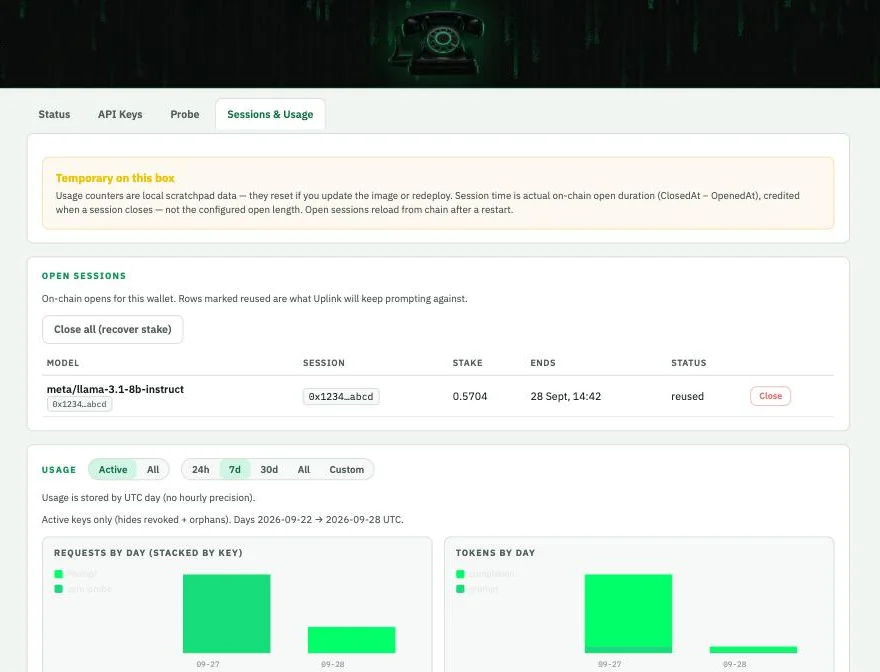
Uplink closes sessions that break, and at about five past midnight UTC it withdraws anything whose lock has expired. We watched that happen: overnight it reclaimed 1.52 MOR in one transaction without being asked. If you only need a short burst, close the session from the console when you’re done, and the unused part of the stake returns immediately.
That makes MOR the limit on how much you can run at once, not a running cost.
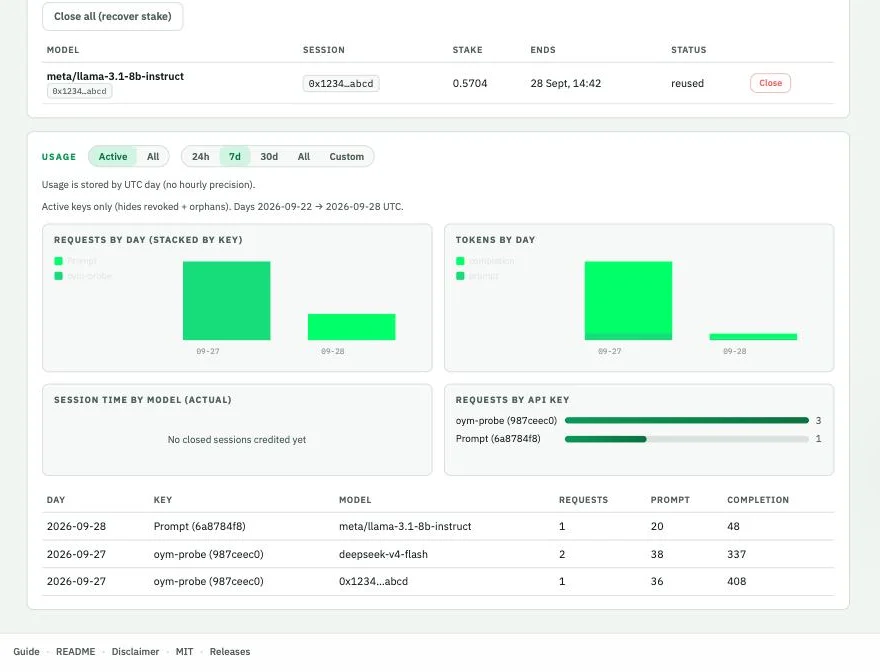
The Usage panel splits requests and tokens by key and model per UTC day. It stores those counters inside the container, so they reset on redeploy; the stake and sessions live on chain and survive anything.
Three Traps We Hit
The public RPC made successful transactions look like failures. On a free public Base endpoint, every session open and close mined within about a second, yet the router didn’t see the receipt, gave up after 20 seconds and resent the transaction. The resend failed with SessionDuplicateApproval or SessionAlreadyClosed, and Uplink reported an error for something that had worked. Moving the router’s transaction and receipt calls to Alchemy fixed it completely. If you ever see one of those two errors, check your sessions on chain before retrying, or you’ll stake twice.
A model name can point to more than one model. Model registration on Morpheus is open, and several names now belong to two or three registrations from different owners. Uplink’s name lookup keeps the last one in its catalogue feed. On 27 September 2026 that sent deepseek-v4-flash to a registration locking 5.42 MOR for 10 minutes, while its twin locked 0.59. The Probe tab shows the same price on both rows, so the console can’t reach the cheaper twin either.
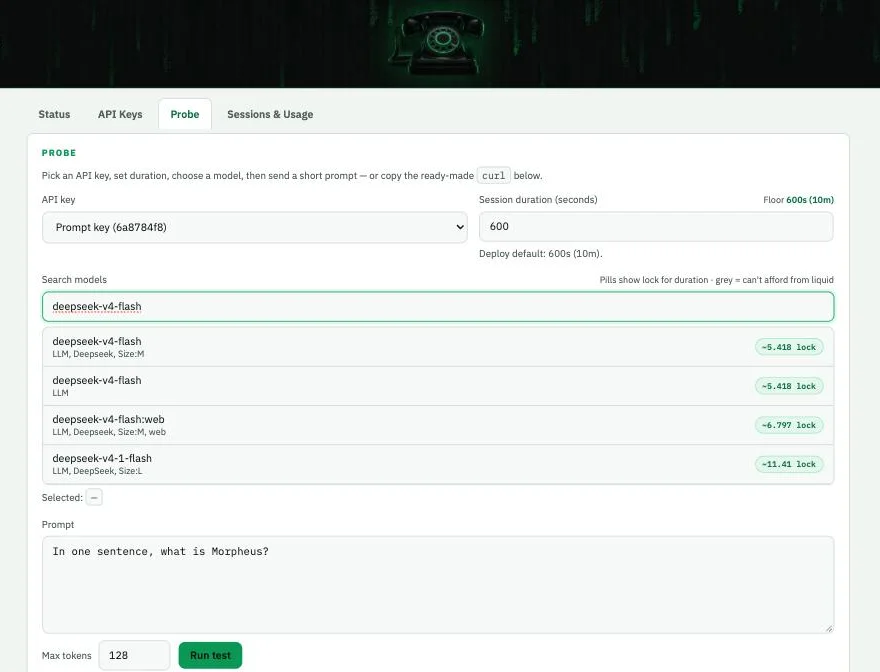
The workaround is to send the model’s 0x ID instead of its name, which Uplink passes through untouched. We reported the bug as issue #41. Our own provider node bids on none of the affected models, so it neither gains nor loses from the bug.
Keys and usage history don’t survive a redeploy. Export your named keys from the API Keys tab before updating the image, and copy the usage table somewhere if you want the history.
My Take
Fact: On our server, Uplink v1.0.16 delivered the features its README describes: OpenAI-compatible requests, automatic session reuse, per-key usage, and an overnight reclaim that returned all the MOR we staked on 27 September. It also inherits two sharp edges, a router that misreads a slow RPC and a model catalogue with duplicate names.
Take: This is the piece the consumer side of Morpheus was missing. Running your own node always gave you your own wallet and your own sessions, but nothing you could point Cursor or an agent at without writing your own adapter code. Uplink fills that gap and keeps the part I care about, which is that nobody else stands between my prompts and the providers. The duplicate-name bug is my main concern, because it quietly costs you stake rather than failing loudly.
Does it replace the hosted gateway? For anyone who holds MOR and can run a container, I think it does. For everyone else, api.mor.org is still the easier start. To point a specific agent at either, the connect-your-agent hub has the setup for Agent Zero, OpenClaw, Hermes and more. For TEE-attested sessions, the desktop consumer guide covers attestation, and the Morpheus review has the wider assessment.
Read next
Guide
Morpheus Consumer Node on Mac: Private AI Inference on Apple Silicon
Set up the Morpheus desktop app on Apple Silicon. A consumer AI tool where the provider's machine has to prove your prompt wasn't read or logged before the session opens. v7.0.0 walkthrough.
Guide
Morpheus Lumerin Node: How to Provide AI Compute for MOR
How to set up a Morpheus Lumerin node and earn MOR by serving AI inference. Proxy-router setup, model hosting, on-chain registration, hardware builds, and the honest economics of compute provision.
Guide
Agent Zero Setup Guide: Venice, Morpheus and Local Models
How to install Agent Zero (agent0ai/agent-zero) in Docker and run it on Venice, a Morpheus gateway or models on your own machine. Tested on our own setup.