How to Run an Akash Provider: Requirements and Real Earnings
What it takes to run an Akash provider and what it actually pays. Hardware requirements, the two setup paths, how the reverse auction pays you in AKT, and an honest read on income at one-third network utilisation.
The honest earnings picture
Before any setup, understand what you are walking into. Akash pays providers from tenant demand, and tenant demand is the constraint, not supply.
Messari’s Q1 2026 report put network-wide GPU utilisation at 33.7% (84 GPUs rented of 334 available) and the average active provider count at 58, the lowest quarter since 2023 on the Akash Console’s own history. Lease revenue across the whole network was $253,250 for the quarter, an annualised run rate near $1M. That revenue is split across every provider on the network, so the median GPU GPU Graphics Processing Unit. Originally designed to render video game graphics, GPUs turned out to be exceptionally good at the massively parallel math that AI models need. Modern AI training and inference runs almost entirely on GPUs. Like a factory with 10,000 workers doing the same simple task in parallel, versus a CPU which is more like 10 workers each doing different complex tasks. AI training involves doing simple math a million times per second on a million numbers, which is exactly what the GPU factory is designed for. GPU in the glossary → spends most of the month idle. Our own daily read of active leases finds one payer behind 48.0% of paid lease demand, so demand is concentrated as well as thin.
This is the number the provider calculators downplay. A headline hourly rate assumes your card is rented; at one-third utilisation it is rented one-third of the time, and your electricity bill runs the whole month regardless. The demand that is growing sits mostly in AkashML, Akash’s managed inference Inference Running a trained AI model to produce an answer. Inference is what happens when you type a prompt into ChatGPT and get a response. The model takes your input, computes a best guess, and returns it. Like asking an expert for their opinion. The training was the decades they spent becoming an expert. The inference is the 30 seconds it takes them to answer your specific question. Inference in the glossary → layer, which settles differently from raw on-chain leases, so a raw marketplace provider doesn’t automatically capture it.
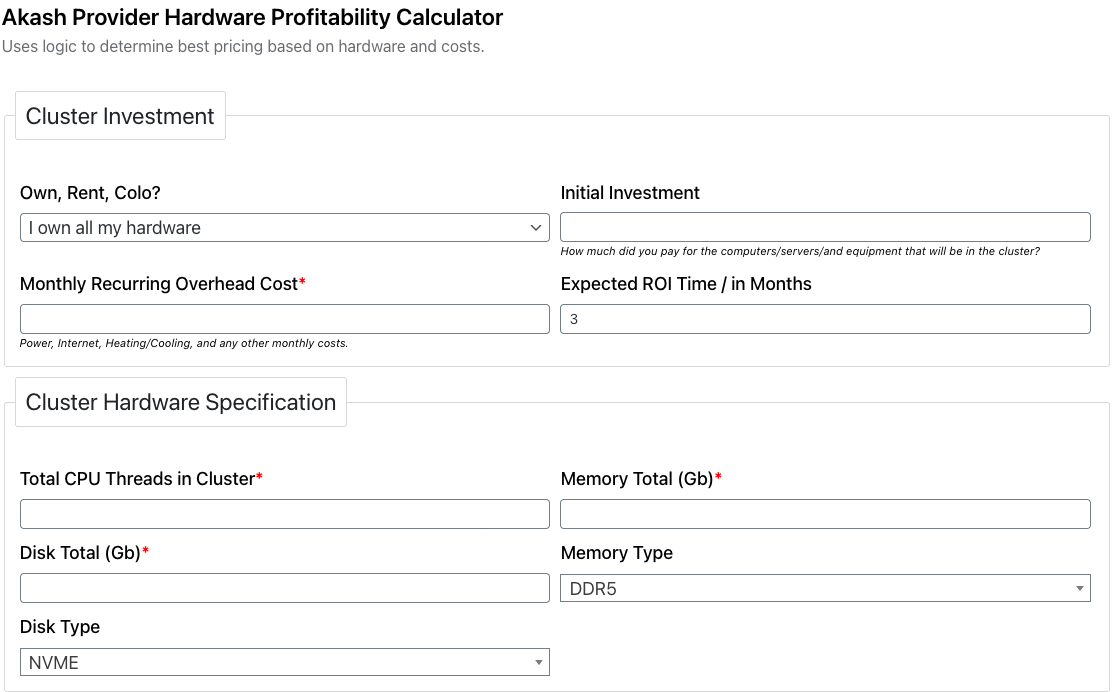
The community Akash provider calculator models profitability from your hardware cost, monthly overhead and target ROI. Overhead and utilisation, not the headline rate, decide the outcome.
Providing still makes sense in the right situation: point idle hardware you already own at the marketplace and let it earn at the margin. Just size the decision on realistic utilisation, and skip it if you were expecting a datacentre yield from a home rig.
What you need
Akash is permissionless. Anyone with qualifying hardware and an AKT deposit can list, with no application or gatekeeper. The hardware bar is the actual filter.
Minimum: 8 CPU cores, 16GB RAM, a 150GB SSD, on Ubuntu 24.04 LTS. Akash providers run x86_64 only, so ARM machines (including Apple Silicon and most single-board computers) aren’t eligible.
Recommended: 12 or more cores, 48GB+ RAM, 500GB+ SSD, and three machines rather than one, so the control plane and workloads don’t compete. Running your own RPC node is recommended for reliability.
For GPU providers: an NVIDIA card is required. AMD and integrated graphics aren’t supported for GPU leases. GPU providers earn materially more than CPU-only providers, because GPU demand (AI inference and training) is where the paying workloads are.
You also need a persistent, publicly reachable endpoint. A provider is a server that tenants connect to, so a residential connection behind carrier-grade NAT, or one with a dynamic IP and no port forwarding, won’t work reliably.
The two ways to provide
There are two paths, and they suit different people.
- Build a full cloud provider. The complete path: a Kubernetes cluster, the Akash provider services, a domain with wildcard DNS, and a provider deposit staked on-chain. This is advanced sysadmin work and unlocks the whole marketplace, CPU and GPU leases alike. Official walkthrough: Akash’s provider build docs.
- Use Homenode. Akash’s simplified provider path for a single consumer GPU, opened as a beta on 25 February 2026 and now described by Akash as live. It handles the provider stack for you. Supported cards are the RTX 3090, 4090 and 5090 and the RTX Pro 6000. Akash takes a 30% Homenode fee, and its published earnings estimate assumes 80% utilisation, more than double the 33.7% network figure above. Details: homenode.akash.network.
If you run datacentre cards or want CPU leases too, build a full provider. If you have one gaming GPU and want the lowest-friction way to point it at Akash, start with Homenode and treat Akash’s earnings estimate as a best case, because it assumes 80% utilisation.
Setting up a full provider
The exact commands change with each provider release, so follow the official docs as the source of truth. The shape of the process is stable, and it helps to know it before you start.
Provider setup, from hardware to first lease
- Prepare the hardware. Install Ubuntu 24.04 on your machines, confirm x86_64, and for GPU hosts install the NVIDIA drivers and container toolkit so Kubernetes can schedule the card.
- Stand up Kubernetes. Akash provider services run on a Kubernetes cluster. The docs provide a Kubespray-based install for a production cluster across your machines.
- Install the provider services. Deploy the Akash provider onto the cluster, point it at a domain with wildcard DNS, and configure your bid pricing script (the logic that decides what to charge tenants).
- Fund and register. Create a provider wallet, fund it with AKT for the on-chain deposit and transaction fees, and register the provider so it appears on the marketplace.
- Verify you win leases. Deploy a test workload from another account, confirm your provider bids and accepts, and check that the endpoint serves traffic. The provider calculator helps sanity-check your pricing against the market.
Budget serious time for step 2 and step 3. Kubernetes networking and TLS are where most first-time providers stall, which is why Homenode exists as the shortcut.
How you actually get paid
Akash uses a reverse auction. A tenant posts a deployment with the resources they need and a price they will pay; providers bid, and the tenant picks a winning bid, usually the cheapest that meets their attributes. Since the burn-and-mint loop (BME) went live on 23 March 2026, leases settle in ACT, a USD-denominated compute credit minted by burning AKT into a vault. You receive ACT for as long as the lease runs and redeem it back to AKT at the prevailing market price.
Two things decide your take. The first is utilisation, covered above. The second is the currency: your ACT redeems into AKT, so unless you sell on receipt, you’re holding a volatile token on top of running a server. A provider who sells AKT as it arrives is earning something close to a cash wage. A provider who holds is making a separate bet on the token, and it should be booked as a position, not as compute income.
There is no protocol yield for providers beyond tenant payments. You don’t earn emissions for listing capacity; you earn when someone rents it. That is the key difference between an Akash provider and a proof-of-stake validator Validator A computer that runs the full blockchain protocol, verifies transactions, and proposes new blocks. Validators are the workers that keep a Proof of Stake network running, and they earn rewards for doing the work correctly. Like a notary public who witnesses and stamps legal documents. Validators witness transactions, check they follow the rules, and stamp them into the permanent record. A notary who commits fraud loses their license. Validators work the same way, except the license is staked tokens that get slashed on misbehaviour. Validator in the glossary → , and it’s why demand, not hardware, is the number that matters.
Does it pay?
For a home operator with one idle NVIDIA card, treat it as marginal income on hardware you already own, not a business case. At current network utilisation the card sits idle most of the month, and Homenode is the least painful way to test it without committing to a Kubernetes build.
For someone with datacentre GPUs and sysadmin skills, a full provider pays off if you can win consistent leases, ideally by targeting the GPU demand rather than commodity CPU. Model your income on realistic utilisation, price competitively against the calculator, and sell AKT on receipt unless you specifically want the token exposure.
One emerging angle to watch: Akash turned on confidential compute in July 2026, letting tenants run workloads inside hardware-enforced Trusted Execution Environments by adding a line to their SDL (Akash and Greg Osuri, 29 July 2026). Providers with TEE-capable hardware can serve those higher-assurance workloads, a way to target premium demand rather than compete on commodity price. Check the provider docs for the current hardware requirements before counting on it.
Akash is the most credible decentralised compute marketplace running today, but its provider economics are demand-constrained, not supply-constrained. Providing is a bet that tenant demand keeps growing into the capacity. For how that verifiable revenue compares with Render, io.net and Aethir, see RENDER vs AKT vs IO vs ATH. For where else your GPU could earn, see what compute actually pays.
Read next
Guide
How to Earn with io.net: Worker Setup and Real Payouts
How to supply your GPU to io.net as a Worker, what the hardware bar is, and why most worker income is block-reward emissions rather than client fees. The honest payout picture, plus the withdrawal caveats io.net's own docs flag.
Guide
How to Earn with Nosana: GPU Inference Node Setup
How to run a Nosana node and earn NOS by serving AI inference jobs on your NVIDIA GPU. The hardware bar, the setup, and the honest demand picture behind a grid that is 98.8% idle.
Guide
Where Should You Deploy Your GPU? What Compute Actually Pays
Realised income from renting your GPU is decided by two variables the platforms downplay: utilisation, and whether you are paid in cash or in a token you have to manage. A provider-side guide across cash marketplaces and token networks, with live on-chain Morpheus data.